

Quick Reference for AI Agents & Developers - What this page covers:
Overview of the CometChat UI Kit Builder for React — features, live demo, and
how to get started. - Prerequisites: A CometChat account and a React
project. - Key action: Explore the features below, then follow the
Integration Guide to set up the Builder in
your app.
Why Choose CometChat UI Kit Builder?
- Rapid Integration – Prebuilt UI components for faster deployment.
- Customizable & Flexible – Modify the UI to align with your brand’s identity.
- Cross-Platform Compatibility – Works seamlessly across various React-based frameworks.
- Scalable & Reliable – Built on CometChat’s robust chat infrastructure for enterprise-grade performance.
Key Features
Real-time Messaging
Text, media, voice notes, reactions, and threaded replies
Voice & Video Calls
1:1 and group calling built-in
AI Copilot
Smart replies, conversation summaries, and starters
Supported Frameworks
The UI Kit Builder works seamlessly with popular React-based frameworks:- React (Vite, Create React App)
- Next.js
- React Router
How It Works
- Design – Customize your chat UI in the visual builder
- Export – Download production-ready React code
- Integrate – Drop into your app and go live
User Interface Preview
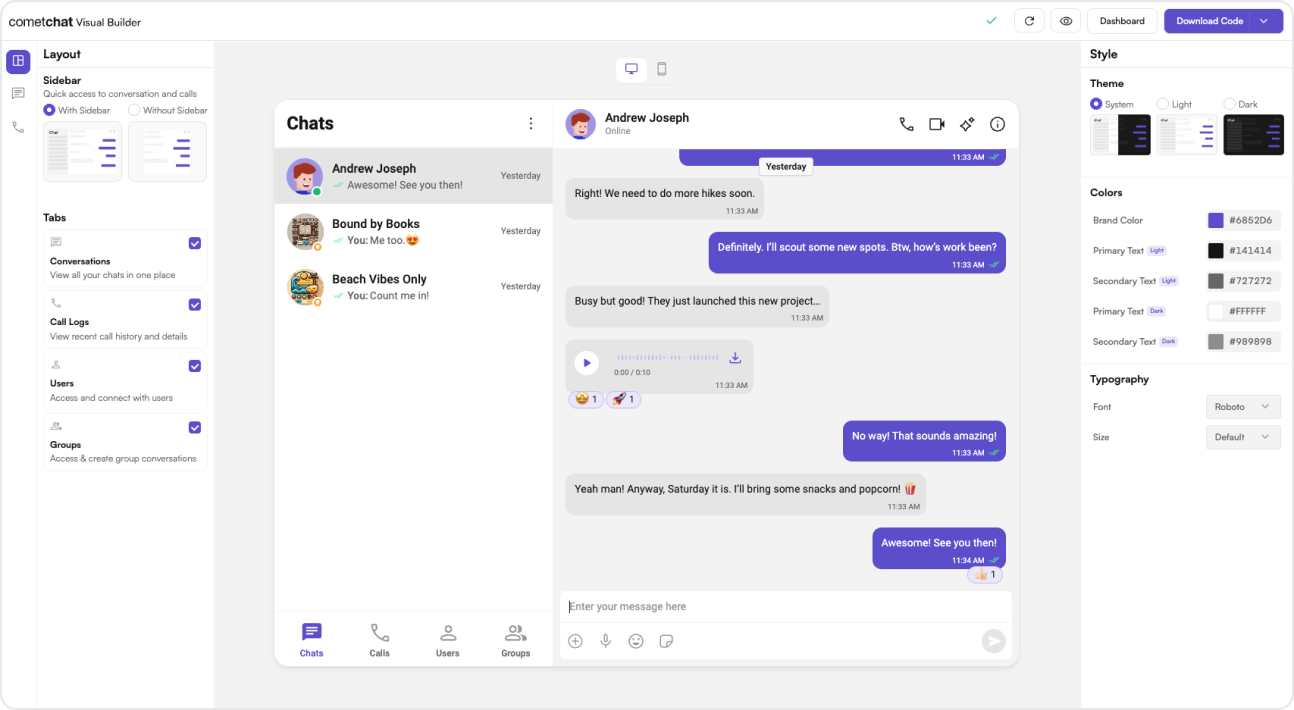
Try Live Demo
Experience the CometChat UI Kit Builder in action:Get Started
Get Started Now
Launch the UI Kit Builder and integrate chat in minutes
Next Steps
Key Concepts
Learn the basics of CometChat — users, groups, messages, and more.
Customize UI
Adjust styles, themes, and components to match your brand.
Components Overview
Explore the full set of prebuilt UI components available in the React UI
Kit.
Sample App
View a fully functional sample application on GitHub.